Showing posts with label COMPUTER. Show all posts

Wednesday, February 22, 2012

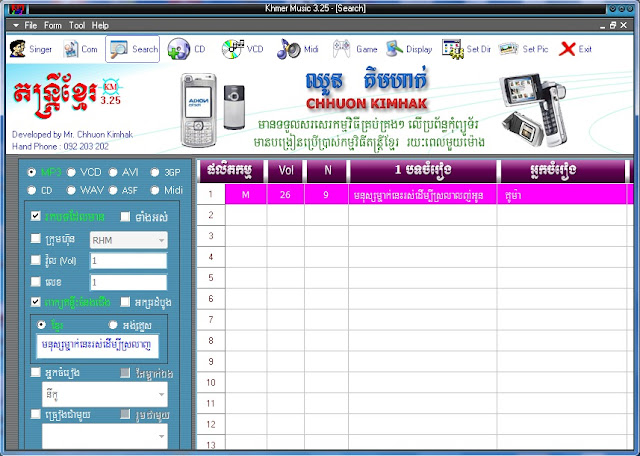
Kh Music 3.25 || តន្ត្រីខ្មែរ ៣.២៥

https://blogger.googleusercontent.com/img/b/R29vZ2xl/AVvXsEiCFoKu1tKyXt_8zrOq07euqFzCWrZ29O1NmaxN3HEX4_uixk-sEedw7YLEQXpxyTIz95SplHxF06X68K_S7pw4b4fb38yMv3V8IkKGF5cNLNYiawoA84npCIlEYQvP1-iJHfoDhYpNWts/s1600/kM325.jpg

អំពី តន្រ្តីខ្មែរ325
តន្រ្តីខ្មែរ៣២៥គឺជាកម្មវិធីមួយដែលមានមុខងារ
ពិសេសសម្រាប់អោយយើងធ្វើការបញ្ចូលនូវបទ
ចម្រៀងថ្មីចាស់ទៅក្នុងវាហើយអាចស្វែងរកបទច
ម្រៀងដោយវាយចំណងជើងនោះវានឹងបង្ហាញអោយ
យើងផ្ទាល់តែម្តង់មិនពិបាកសម្រាប់ស្វែងរក
បទចម្រៀងផ្សេងៗទេនិយាយរួមមកកម្មវិធីត
ន្រ្តីខ្មែរ៣២៥គឺអាចជួយសំរួលដល់ការរក្សាទុក
នូវតន្រ្តីហើយនិងងាយស្រួលដើម្បីស្វែងរក...។
 

វចនានុក្រមអាន-A.N.T 2010​ ជំនាន់ទី1.02

ទាញយកវចនានុក្រមអាន-ANT 2010​ v1.02:
link1:ANT Dictionary 2010 V1.02.part1.rar
link2: ANT Dictionary 2010 V1.02.part2.rar

កម្មវិធីទស្សទាយលេខទូរសព្ទនឹងចាក់MP3

Phone fortune Teller and MP3 player​
ហើយកម្មវិធីនេះផងដែរគឺជាកម្មវិធីសម្រាប់ទស្ស ទាយលេខទូរស័ព្ទថាល្អរឹអាក្រក់ ហើយយើងអាចធ្វើការជ្រើស រើសបទចម្រៀងដើម្បីលេងនៅលើវាបានទៀតផង
ចំពោះអ្នកបង្កើតកម្មវិធីនេះគឺមានឈ្មោះនៅក្នុងកម្ម វិធីនេះស្រាប់ហើយ។តោះសូមទាញយកប្រើទាំងអស់គ្នា។

Friday, February 17, 2012

បម្លែងការសរសេរទៅជាសម្លេងដោយប្រើ Notepad

វាជាគន្លឹះដល់ពិសេសមួយក្នុងការប្រើកម្មវិធី Notepad ដែលមានស្រាប់ក្នុង Window ដើម្បីបម្លែង
រាល់ការសរសេររបស់អ្នកទៅជាសម្លេង។វាសាមញ្ញហើយដំណើរការបានគ្រប់ Window ទាំងអស់
របស់ Microsoft ។
កំរិតពិបាកៈ ងាយស្រួល
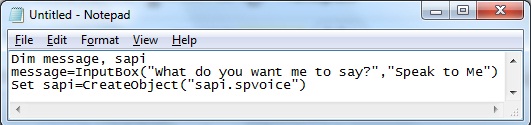
ជាដំបូងសូមបើកម្មវិធី Notepad រួចចម្លងកូដទាំងអស់នេះទៅដាក់ក្នុង Notepad របស់អ្នក
Dim message, sapi
 message=InputBox("What do you want me to say?","Speak to Me")
 Set sapi=CreateObject("sapi.spvoice")
 sapi.Speak message

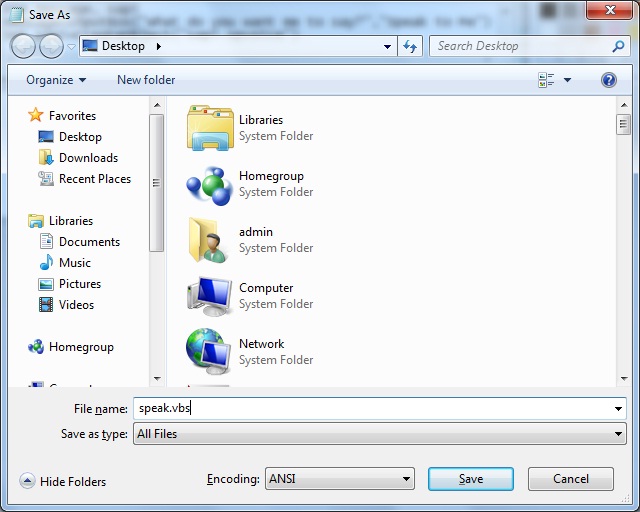
បន្ទាប់មកនៅត្រង់ Save as type សូមយក All file ចំណែកឈ្មោះសូមដាក់ Speak.vbs ឬអ្វី
ក៏បានឱ្យតែមានកន្ទុយជា .vbs។

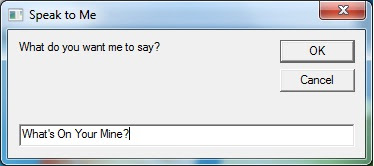
ឥឡូវសូមបើក Speak.vbs រួចសរសេរអ្វីដែលអ្នកចង់ឱ្យវាអានរួចចុច Ok។

ជួនកាលវាក៏អាចធ្វើឱ្យមិត្តភក្តិអ្នកភ្ញាក់ផ្អើលនឹងគន្លឹះមួយនេះផងដែរ។

[Software] AV VCS 3.0.74

AV VCS 3.0.74 | 6.3 MB

AV VCS - a unique tool to change the voice, the dream of humorists, telephone terrorists and karaoke lovers:) The user speaks into the microphone, and the program in real time makes his voice sound lower (like a solid guy:) or higher (as a woman or teenager:). Pitch is set with the slider "Pitch Level", and the output signal can be further "refine" with 9-band equalizer. Of course, a small black device from the horror movie "Scream" this prog does not beat, but the fact that your voice, passing through the AV VCS, dear mother did not know the developers guarantee. This is easily seen, writing, listening to his "new" voice with Vindoznogo standard recorder. In addition, AV VCS is compatible with all software for internet telephony (NetMeeting, net2phone, etc). So this prog is applied not only for the jokes, but also to preserve anonymity when communicating web voice.


The user speaks into the microphone, and the program in real time makes his voice sound lower (like a solid guy :) or higher (as a woman or young person :).
Height is given voice by using the slider "Pitch Level", and the output signal can be further "refine" with a 9-band equalizer. Of course, the little black device from the horror movie "Scream" this prog does not beat, but the fact that your voice is passed through the AV VCS, dear mother did not know the developers guarantee. This is easily seen, writing, listening to his "new" voice with a standard Vindoznogo recorder. In addition, AV VCS is compatible with all software for internet telephony (NetMeeting, net2phone, etc). So this prog is used not only for practical jokes, but also to preserve anonymity when communicating on the web voice.


Language: English
Year: 2012
Title: AV VCS
Version: 3.0.74
Operating system: Windows XP/Vista/7


Download MagaFile: http://migafile.com/8hpkw8ckdsh6

UNLOCK HUAWEI E153u( CellCard) Free and Work 100%


ចំពោះវិធីក្នុងការ Unlock Huawei E153u នេះគឺវាដូចទៅនឹងវិធី Unlock E173 ដែលខ្ញុំបានរៀបរាប់នៅប្រកាស
មុន Unlock Huawei E173(Metfone) USB Modem Free and Work 100%
Modem របស់លោកអ្នកនឹង Relock នៅពេលដែលលោកអ្នកដក Modem ចេញ បានន័យថាលោកអ្នក
ត្រូវប្រើកម្មវិធីនេះដើម្បី Unlock រាល់ពេលដែលដោត Modem ប្រើប្រាស់។
វិធីធ្វើៈ
ជំហ៊ានទី១:សូមដោនឡូតកម្មវិធី Huawei-Modem-Unlockerv5.8.1  ឬ
http://www.mediafire.com/?b9qtk8bd71s63xa
ជំហ៊ានទី២: សូមដាក់ Sim ផ្សេងក្រៅពី Sim ដែល Support នឹងម៉ូឌឹមរបស់អ្នកដើម្បីដំណើរការ Unlock។
ពេលនោះវានឹងបង្ហាញផ្ទាំងមួយដែលប្រាប់អ្នកថា ស៊ីមរបស់អ្នកមិនអាចប្រើប្រាស់នឹងម៉ូឌឹមនេះបានទេ
នេះព្រោះម៉ូឌឹមរបស់អ្នកមិនទាន់បាន Unlocked ដូចនេះសូមចុច X ឬ OK ដើម្បីបិតផ្ទាំងនោះ។

Software

UNLOCK HUAWEI E153u( CellCard) Free and Work 100%

ចំពោះវិធីក្នុងការ Unlock Huawei E153u នេះគឺវាដូចទៅនឹងវិធី Unlock E173 ដែលខ្ញុំបានរៀបរាប់នៅប្រកាស
មុន Unlock Huawei E173(Metfone) USB Modem Free and Work 100%
Modem របស់លោកអ្នកនឹង Relock នៅពេលដែលលោកអ្នកដក Modem ចេញ បានន័យថាលោកអ្នក
ត្រូវប្រើកម្មវិធីនេះដើម្បី Unlock រាល់ពេលដែលដោត Modem ប្រើប្រាស់។
វិធីធ្វើៈ
ជំហ៊ានទី១:សូមដោនឡូតកម្មវិធី Huawei-Modem-Unlockerv5.8.1  ឬ
http://www.mediafire.com/?b9qtk8bd71s63xa
ជំហ៊ានទី២: សូមដាក់ Sim ផ្សេងក្រៅពី Sim ដែល Support នឹងម៉ូឌឹមរបស់អ្នកដើម្បីដំណើរការ Unlock។
ពេលនោះវានឹងបង្ហាញផ្ទាំងមួយដែលប្រាប់អ្នកថា ស៊ីមរបស់អ្នកមិនអាចប្រើប្រាស់នឹងម៉ូឌឹមនេះបានទេ
នេះព្រោះម៉ូឌឹមរបស់អ្នកមិនទាន់បាន Unlocked ដូចនេះសូមចុច X ឬ OK ដើម្បីបិតផ្ទាំងនោះ។
ជំហ៊ានទី៣: ឥឡូវសូមបើកកម្មវិធី Huawei Modem Unlocker ។ វាគួរតែស្គាល់ម៉ូឌឹមរបស់អ្នកដោយស្វ័យប្រវត្តិ បើសិនជា
វាមិនស្គាល់សូមចុចយក “Auto Connection” នៅត្រង់ Connection Mode បន្ទាប់មកសូមបិតនឹងបើកកម្មវិធីនេះម្តងទៀត។
ជំហ៊ានទី៤:នៅពេលដែលកម្មវិធីបានស្គាល់ម៉ូឌឹមរបស់អ្នកហើយ សូមចុច “Calculate” ប៉ូតង់ដើម្បីអាន the nck និង Flash code។

ជំហ៊ានទី៥:សូមជ្រើសរើសយក “Auto-Unlock Modem”ដែលនៅក្នុងមុខងារ direct modem reader/unlocker បន្ទាប់
មកសូមចុចទៅលើប៉ូតង់ Unlock ។

ជំហ៊ានទី៦: នៅពេលដែលអ្នកទទួលបានលទ្ធផលថា “SIM in Modem is accepted. Unlocked” មានន័យថាអ្នក
បានជោគជ័យក្នុងការ Unlock នេះហើយ ពេលនេះអ្នកអាចប្រើអ៊ីនធឺណេតជាមួយស៊ីមដទៃៗទៀត។

សូមបិតកម្មវិធី Huawei Unloker រួចទៅមើលកម្មវិធីរបស់ម៉ូឌឹមអ្នក។មានសេវាបានន័យថាស៊ីមរបស់អ្នកអាចប្រើប្រាស់
ជាមួយម៉ូឌឹមនេះបានហើយ។

[Software] Internet Download Manager 6.09 Build 2 Final

Internet Download Manager 6.09 Build 2 Final | 5 Mb

Internet Download Manager (IDM) - a program that allows to increase the speed of downloads up to 500 percent, resume and schedule downloads. Various methods for speeding up downloads, dynamic file segmentation and simultaneous download of several parts, the use of free and open connections without reconnect and more. Built-in dialer to connect on a schedule. support for firewalls, proxies and mirrors, FTP and HTTP protocols, redirects, cookies, download queues, user authorization. Internet Download Manager is integrated into Microsoft Internet Explorer, Netscape, MSN Explorer, Opera and Mozilla and automatically intercepts the download.

Internet Download Manager supports the FTP, HTTP, HTTPS, controls the contents of the MP3 audio and MPEG video, and supports a large number of server platforms. The program integrates with confidence in the browsers Microsoft Internet Explorer, Netscape, MSN Explorer, AOL, Opera, and Mozilla to manage your downloads.

Unlike other download managers and accelerators, where the files are segmented before downloading, Internet Download Manager segments downloaded files dynamically during download process. In addition, Internet Download Manager reuses available connections without additional connect and login stages to achieve best acceleration performance.

Features IDM:
• Dynamic file segmentation, which uses a rule of division into two parts
• Multiple use of compounds that have completed their parts of the file without any additional stages login
• Customizable timeout and the number of connections for IDM settings for your connection type

Key features of Internet Download Manager:
• Supports all popular web browsers
• Built-in download accelerator.
• Easy downloading with one click
• The resumption of interrupted downloads downloads
• Easy Installation Wizard program
• Automatic checking of downloaded files to your antivirus
• Support Drag and Drop function
• Enhanced integration with web browsers
• Built-grabber sites
• Customizable interface
• Support for multiple types of proxy servers
• Support for the main authentication protocols
• Limit speed of file downloads
• Multilingual user interface, including the Russian language
• Quick Update Feature
• The division into categories of downloaded files
• View archives.
• Advanced Scheduler.
• Sounds for various events.
• Grabber YouTube videos
• Reference and User's Guide.

Changes in 6.9:
• Added support for Firefox and Firefox 11 12
• Improved Advanced Browser Integration

[Software] ងាយស្រួលដោះកូដម៉ូឌឹម Huawei E173 metfone

ឥឡូវនេះលោកអ្នកអាចដោះកូដម៉ូឌឹម Huawei E173 metfone ដោយគ្រាន់តែចុចតែម្តងគឺ ចំណាយពេលត្រឹម តែពីរទៅបីវិនាទីតែប៉ុណ្ណោះហើយងាយស្រួលណាស់ មិនពិបាកដូចមុន ដែលត្រូវធ្វើជាច្រើនដំណាក់កាលបាន ប៉ុន្តែវាមិនអាច Unlock ឱ្យបានសម្រេចតែម្តងនោះទេ គឺវា Unlock ជាបណ្តោះអាសន្ន។
អ្វីដែលសំខាន់នោះគឺកម្មវិធីនេះបង្កើតឡើងដើម្បីជួយអ្នកក្នុងការ Unlock ម៉ូឌឹមដោយប្រើច្រើនដំណាក់កាល
មកធ្វើត្រឹមការចុចតែម្តង។
សូមដោនឡូតកម្មវិធីនៅត្រង់នេះ
Huawei Temp Unlocking V1.0 ​ ឬ http://www.mediafire.com/?x14yjy4ik3pm34n
សេចក្តីណែនាំៈ

  • សូមដាក់ Sim ផ្សេងក្រៅពី Sim Metfone ដើម្បីដំណើរការ Unlock។  EX: Sim Smart, Sim Mfone...Sim hello និងអាចយកSim ផ្សេងៗពីនេះក៏បាន ។
  • ដោតម៉ូឌឹម Metfone 3G ចូលក្នុងកុំព្យូទ័ររបស់អ្នករួចសូមដំឡើងកម្មវិធីរបស់ម៉ូឌឹម(ករណីលោកអ្នកមិនទាន់
បានដំឡើង)
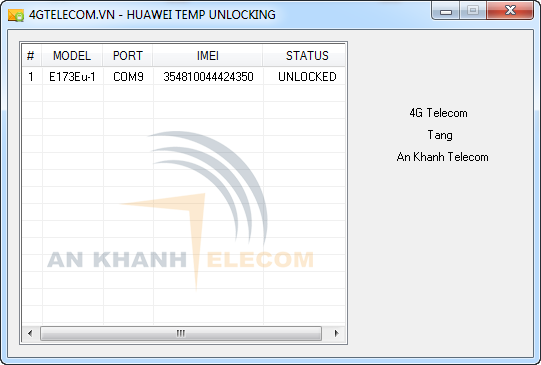
  • រួមហើយអ្នកលោកសូមដំនើរការកម្មវិធី Huawei Temp Unlocker រួចរងចាំកម្មវិធីនោះបន្តិច បន្ទាប់មកចុច Unlock នោះម៉ួឌឹមលោកអ្នកនិងត្រូវបាន Unlock ។

បានសាកល្បងជោគជ័យលើ Huawei E173u-1 Metfone 3G។

សូមចំណាំៈ វាគ្រាន់តែជាការ Unlock បណ្តោះអាសន្នប៉ុណ្ណោះលោកអ្នកត្រូវធ្វើបែបនេះរាល់ពេលប្រើប្រាស់ម៉ូឌឹម។ ខ្ញុំគិកថាលោកអ្នកអាចនិង Unlock​ បានពីគេហទំព័ thearapoipet.blogspot.com ។

Thursday, February 16, 2012

[Software] 4Videosoft YouTube Video Converter 5.0.8

4Videosoft YouTube Video Converter 5.0.8 | 21.4 MB

4Videosoft YouTube Video Converter is designed for YouTube fanatics to convert any video formats MPG, MPEG, MP4, AVI, MOD, etc. to YouTube FLV and SWF format. Then you can easily upload to all the video sites like, such as YouTube, Myspace, Yahoo! Video, Google Video, etc.

4Videosoft YouTube Video Converter provides you with powerful editing functions: modify video effect, trim video clips, crop video frame, merge video chapters and add watermark. These functions can help you to recreate your own video to share with others.

- Convert any video to FLV, SWF format for you to upload to YouTube
- Support converting source file(s) to more than one format respectively
- Versatile editing functions for you to optimize your own video

Key Features of YouTube Video Converter

Convert Video to YouTube

- 4Videosoft YouTube Video Converter can convert all the regular video formats to FLV, SWF for you to upload to any video sites like YouTube.
- 4videosoft YouTubr Video Converter enables you to extract audios from video files.
- This video to YouTube converter supports batches conversion for you to get multiple output video formats at one time.

Edit Converted Video
- 4Videosoft YouTube Video Converter allows you to get any time-length clips from your video sources by setting the exact start and end time, or by dragging the slider bar.
- 4Videosoft YouTube Video Converter helps you crop video and adjust the output aspect ratio to get the perfect playing region for your player.
- Merge your selected video sources into one file after conversion for you to enjoy successively.
- Deinterlacing can be done to improve the video quality by converting interlacing video to the progressive video.

Set Video Profile
- All the parameters of profile can be provided for you to choose the exact settings for your players with the assistance of YouTube Video Converter. All those parameters can be saved as user defined profile for your future use.
- Support selecting audio tracks and subtitle to be converted for the target video.
- You can choose the suitable video output format for your player.

Best User Experience
- 4Videosoft YouTube Video Converter is absolutely easy to use. The whole process of conversion can be finished in a few clicks.
- With advanced NVIDIA® CUDA™ technology, 4videosoft YouTube Video Converter makes your conversion speed 6X faster than before, totally supporting multi-core CPU.
- This YouTube Video Converter allows you to add text or picture watermark for your converted video.
- You can preview both original video and converted video at the same with 4Videosoft Youtube Video Converter.

Home Page - http://www.4videosoft.com

Tuesday, January 24, 2012

Driver Checker v2.5.7 | កម្មវិធីត្រួតពិនិត្យ Driver


Driver Checker is designed to effectively detect the outdated or broken device drivers and satisfy the application upgrade requirements if you can not find the new versions available from the original manufacturers. Driver Checker can deep scan your hardware devices, detect and update the outdated drivers if available, completely backup them and restore them if necessarily; You can also uninstall the drivers completely on demand. Driver Checker does all of these through the easy-to-use interface and makes your system running more secure, stable and always up-to-date.

Key Features and Benefits of Driver Checker:
Starightfoward and intuitive interface
Better PC performance and improved stability
Access to the largest drivers database in the industry
Continous updates for the latest manufacturer drivers
Submit the unavailable drivers updated in next version
Unlimited technical supports with our 24x7 technicians
Automatically update and maintain these drivers: Printer Drivers, USB Drivers, Sound/Audio Drivers, Vista Drivers, Bluetooth Drivers, Mouse Drivers, Keyboard Drivers, RAID Drivers, Scanner Drivers, Video Drivers, Modem Drivers, Network Drivers, Linksys Drivers, Webcam Drivers, Graphic Drivers, VGA Drivers & Other Windows Drivers!

- Requirement
OS : Win XP/2000/Vista/Win 7
Language : English


DOWNLOAD LINK: http://www.tusfiles.net/9dlepmh9omqh

Wednesday, January 18, 2012

Cakewalk Sonar X1 Producer ESD AiRISO || អ្នកជំនាញខាងដូរតន្ត្រី


ចុចទាញយកកម្មវិធីCakewalk Sonar X1 Producer ESD AiRISO | File torrent

ស្វែង​យល់​ពី​កម្មវិធី​សូណា ( Sonar 8.0)

កម្មវិធី​សូណា គឺ​ជា​កម្មវិធី​មួយ​ដែល​បង្កើត​ឡើង​សម្រាប់​ជួយ​សម្រួល​កិច្ច​ការងារ​ផលិត​ សំឡេង​និង​តន្ត្រី​នៅ​លើ​កុំព្យូទ័រ​របស់​អ្នក​។ កម្មវិធី​នេះ​ត្រូវ​បាន​រៀប​ចំ​សម្រាប់​តន្ត្រីករ អ្នក​និពន្ធ​អ្នក​សម្រួល​តន្ត្រី វិស្វករ​សំឡេង អ្នក​ផលិត​សំឡេង​ហ្គេម អ្នក​ជំនាញ​ថត​សំឡេង។​កម្មវិធី​សូណា​ធ្វើការ​ជាមួយfile ជា​ច្រើន​ដូចជា: Wave, MP3, ACIDized waves, WMA, AIFF និង​ប្រភេទ files សំឡេង​ជា​ច្រើន​ទៀត។ កម្មវិធី​សូណា​មាន tools ជា​ច្រើន​ដែល​ធ្វើ​អោយ​អ្នក​ប្រើប្រាស់​អាច​កែ​ឆ្នៃ​បាន​តាម​ចិត្ត​​ដែល​អាច ​បង្កើន​ការ​ផលិត​អោយ​កាន់​តែ​មាន​គុណភាព​និង​ប្រសិទ្ធភាព។កម្មវិធី​សូណា​ មាន​លក្ខណ​ពិសេស​ជា​ច្រើន​លើស​ជាង​ការ​ដែល​គ្រាន់​តែ​ផលិត Midi និង Audio Files។ តែ​ក៏​កម្មវិធី​ដែល​មាន​តួនាទី​ដ៏​សំបូរ​បែប​មួយ​ដែល​អាច​គាំទ្រ​យ៉ាង​ពេញ​ ទូលំ​ទូលាយ​ជាមួយ​និង audio plug-ins, software synthesizers, StudioWare, MFX MIDI plug-ins, និង MIDI Machine Control (MMC) នៃ external MIDI gear។
១- ដំណើរការ​កម្មវិធី
ក្នុង​ការ​ចាប់​ផ្ដើម​ដំណើរការ​កម្មវិធី​យើង​គ្រាន់​តែ៖ ចុច Start > Program ឬ > ​ចុច២ដង លើ ​ Sonar 8.0 icon​នោះ​កម្មវិធី​ក៏​ចាប់​ដំណើរការ។
២- ការ​បង្កើត​ការងារ​ថ្មី ( Create New Project )
ចុច File Menu > New ឬ > ចុច Icon Newនៅ​លើ Tool Bar នោះ​យើង​និង​មាន​ទំព័រ​ការងារ​ថ្មី​មួយ។
ការ​ជ្រើសរើស​ប្រភេទ​ទំព័រ​ការងារ​ថ្មី (choosing a temple for new project)​នៅ​លើ​កម្មវិធី​សូណា​វា​មាន​គំរូ​ទំព័រ​ការងារ​ជា​ច្រើន​មាន​ ប្រយោជន៍​សម្រាប់​ការប្រើប្រាស់​របស់​យើង​ដូចជា:
៣- ជួរ​សំឡេង​ ( Tracks )​
-ជួរ​នៃ​ត្រាក់​សំឡេង(Tracks): មាន​២​ប្រភេទ​
- ជួរ​ត្រាក់​សំឡេង​ (Audio Tracks)
- ជួរ​ត្រាក់​មី​ឌី​ណោត​ភ្លេង ​(Midi Tracks)។
៤- ការ​ថត ( Recording )​
-ថត​មីឌី​ណោត​ភ្លេង​(midi recording)​
ចុច​លើ Midi Track > ចុចRecoding Button R រួច​ចុច Recording Button នៅ​លើ Tool Bar។
-ថត​ទំព័រ​ការងារ​ជា​សំឡេង(Audio recording) ចុច​លើ Audio Track > ចុចRecoding Button R រួច​ចុច Recording Button នៅ​លើ Tool Bar។
៦- ការ​រក្សា​ទុក​ទំព័រ​ការងារ ( Saving )
-រក្សា​ទំព័រ​ការងារ​មីឌី​ណោត​ភ្លេង(Save as midi file) ចុច​លើ File Menu > ចុចSave As រួច​វាយ​បញ្ចូល​ឈ្មោះ​នៅ​ក្នុង​ប្រឡោះ File Name រួច​ជ្រើសរើស​ប្រភេទ file ជា .midi នៅ​ក្នុង​ប្រឡោះ Save as Type > ​រួច​ចុច Save។
-រក្សា​ទំព័រ​ការងារ​សំឡេង​ឬ​មីឌី​និង​សំឡេង(Save as bundle file) ចុច​លើ File Menu > ចុចSave As រួច​វាយ​បញ្ចូល​ឈ្មោះ​នៅ​ក្នុង​ប្រឡោះ File Name រួច​ជ្រើសរើស​ប្រភេទ file ជា .cakewalk bundleនៅ​ក្នុង​ប្រឡោះ Save as Type > រួច​ចុច Save។

Eset Smart Security 5 សម្រាប់​ម៉ាស៊ីន​កុំព្យូទ័រទាំង​ 32 bit និង​64 bit


Eset Smart Security 5 ​ជំនាន់​ ចុងក្រោយ​បំផុត​នេះ​ លោក​អ្នក​នឹង​ទទួល​បាន​សុវត្ថិភាព​ខ្ពស់​ មាន​ទំហំ​តូច​ស៊ី​មេម៉ូរី​តិច​ និង​មាន​ប្រតិបត្តិការ​ស្កេន​លឿន​ទៀត​ផត។ ​ជាពិសេស​នោះEset Smart Security 5 ផ្ដល់ ​នូវ​ទំនុក​ចិត្ត​ខ្ពស់​ក្នុង​ការ​ការពារ​កុំព្យូទ័រ​លោក​អ្នក​ពី​មេរោគ​ ផ្សេងៗ​ ហើយ​ថែម​ទាំង​អាច​ជ្រើស​យក​មុខងារ​ផ្លាស់ប្ដូរ​ជា​លក្ខណៈ​ផ្ទាល់​ខ្លួន​ Online និង​ Offline៕
នៅ​ពេល​ដែល​អ្នក​ទាញ​យក​កម្មវិធី​នេះ​រួច​ លោក​អ្នក​អាច​ដំឡើង​នៅ​លើ​ម៉ាស៊ីន​កុំព្យូទ័រ​របស់​អ្នក​បាន​ ដែល​នៅ​ក្នុង​នោះ​យើង​បាន​ដាក់​បន្ថែម​នូវ​ File Update ​ទាំង​សម្រាប់​ Version 32bit និង​64bit។
ទាញ​យក​កម្មវិធី៖ Eset Smart Security​ 5

Tuesday, January 17, 2012

3DP Net 11.05 || កម្មវិធីទាញយក Driver ឲ្យត្រូវនឹងប្រព័ន្ធដំណើរការ


ទាញយក (614ដង | 35.40 MB) តើអ្នកធ្លាប់មានបញ្ហាឈឺក្បាល​ក្នុង​ការ​ស្វែងរក drivers សម្រាប់​កុំព្យូទ័រ​របស់អ្នក ឬ​ទេ?
3DP Net គឺជា​កម្មវិធី​ដែល​លទ្ធភាព​ខ្ពស់​ក្នុង​ការ​ទាញយក drivers ឲ្យ​ត្រូវនឹង​ប្រព័ន្ធ​ដំណើរ​ការ​របស់អ្នក និង ធ្វើការ​បញ្ចូល drivers ដោយខ្លួនឯង នៅពេល​អ្នកបាន​ភ្ជាប់​ជាមួយ Network ហើយ​ធ្វើការ​ដំឡើង Windows សារឡើងវិញ ។ 3DP Net 11.05 អាច​ធ្វើការ updates drivers និងអាច​ដំណើរ​ការត្រូវជាមួយ Hardware បាន​ច្រើន ។
​តម្រូវ​ការ៖  Windows 2000/XP/2003/Vista/Server 2008/7

Thursday, January 12, 2012

របៀបប្ដូរ Folder Backgrounds ក្នុង Windows Explorer នៅ​ក្នុង Windows 7


ការអនុវត្តន៍ៈ

លោកអ្នក​ក៏​អាចកំណត់ background ជារូបភាពសម្រាប់ folder ហើយអាចប្ដូរពណ៌អក្សរឲ្យស៊ី​គ្នា​ទៅនឹង background ។
ដើម្បី​ធ្វើដូចនេះ​លោកអ្នក​អាច​ប្រើ​កម្មវិធី Windows 7 Folder Background Changer សម្រាប់​ធ្វើជា​ជំនួយការ​ក្នុង​ការកែប្រែបែបនេះ លោកអ្នក​ចាំបាច់ដំណើរការ​កម្មវិធី​នេះជាលក្ខណៈ Administrator ដោយ​គ្រាន់តែ right-click លើ file W7FBC.exe ហើយជ្រើសយក Run as administrator ។
​បញ្ជាក់​៖ ប្រសិន​លោកអ្នក​មិនដំណើរការ​កម្មវិធី​នេះជាលក្ខណៈ administrator នោះវាមានឱកាស​ច្រើន​ដែល​ធ្វើឲ្យ​កម្មវិធី​នេះគាំង ហើយរាល់កំណែប្រែទាំងឡាយគឺមិនមានឥទ្ធិពលឡើយ

នៅពេល​កម្មវិធី​នេះ​ត្រូវបាន​បើក សូមចុច Browse ដើម្បី​ជ្រើសយក folder ដែល​អ្នកចង់ដាក់ background រូបភាពនៅ​ក្នុង​ទីតាំងណាមួយ 
បន្ទាប់មកសូមចុចលើ Change Background Image ដើម្បី​ជ្រើសរើស​រូបភាពយកមក​ធ្វើជា background របស់ folder ដែល​ត្រូវបាន​ជ្រើសយកមក
បន្ទាប់ពីដាក់រូបភាព​ធ្វើជា background ហើយ​លោកអ្នក​អាចដាក់ពណ៌អក្សររបស់​ឈ្មោះ folder និង file បានថែមទៀតដោយ​លោកអ្នក​គ្រាន់តែ​ចុច​នៅលើ​ផ្ទៃប្ដូរពណ៌នៅខាងមុខ Text Color រួច​ជ្រើសរើស​ពណ៌ណាមួយ អ្នកអាចដាក់ស្រមោលអក្សរ ព្រមទាំងអាចកំណត់ឲ្យ sub folders នៅ​ក្នុង folder នេះមានលក្ខណៈដូចទៅនិង folder មេបានផងដែរ​លោកអ្នក​គ្រាន់តែ​ចុច​នៅលើ​ប្រអប់មុខ Show Shadow Under Text និង Apply to Sub Folder
នៅពេល​ដែល​ការកែប្រែ​ត្រូវបាន​ចប់សព្វគ្រប់ លោកអ្នក​គ្រាន់តែ​ចុចបិទ​កម្មវិធី​នេះ ហើយបើក folder ដែល​បានកំណត់នោះអ្នកនឹងបានឃើញដូចអ្វី​ដែល​លោកអ្នក​ចង់បាន

Wednesday, December 14, 2011

Novicorp WinToFlash 0.6.0000 beta||សាកល្បង Boot window តាម Flash ជាមួយ ធារ៉ា ប៉ោយប៉ែត


គឺជាកម្មវិធីមួយ ដែលអាចអោយលោកអ្នក អាចកែ Flash ទៅ CD ព្រមទាំង Boot ជាមួយ Window យ៉ាងងាយស្រួល មិនចំណាយលុយក្នុងការទិញ External DVD or CD ប្រសិនបើលោកអ្នក ប្រើ Laptop Mini ដូចខ្ញុំបាទ គ្រាន់ទៅគេហទំព័រខ្ញុំបាទ នឹងទទួលបានកម្មនេះភ្លាម នៅក្នុងកញ្ចប់នឹងខ្ញុំបាទបានដាក់ជា វីឌីអូ សម្រាប់ទស្សនា រួចអនុវត្តន៍តាមជាការស្រេច ដូចជា ធារ៉ា នៅជិតលោកអ្នកដែរ។ គេហទំព័រ http://thearapoipet.blogspot.com/ សូមជូនពរ អោយការប្រើប្រាស់របស់លោកទទួលបានជោគជ័យ។
ទាញយក||Download

DriverEasy Professional v3 1 1 40990 Crack || Search Backup Restore Download Driver

 
កម្មវិធីនេះគឺជាកម្មវិធីសម្រាប់ Backup and Restore Driver, ស្វែងរក Driver ទាញយក Driver ងាយស្រួលប្រើ។ ដូច្នេះទើបគេហទំព័រ http://thearapoipet.blogspot.com/ ដាក់ជូនឲ្យប្រើ ហើយជាពិសេសគឺកម្មវិធី Full Software មានទាំង Crack នៅក្នុងនេះស្រាប់។ សូមរីករាយក្នុងការប្រើដោយជោគជ័យ!
Mediafire
Jumbo


Partner